

Download 3D Realistic Fireplace Screen Saver – 3D fireplace, realistic fire, screen saver, virtual fireplace, cozy ambiance, relaxing flames, fireplace screensaver, home decor, digital fireplace, ambient lighting
Overview
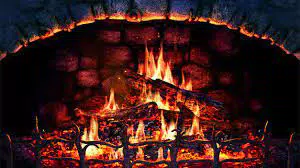
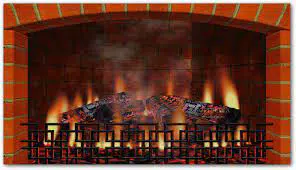
The 3D Realistic Fireplace Screen Saver delivers a lifelike virtual fire experience designed to enhance digital environments with warmth and ambiance. Tailored for users seeking a serene, immersive screensaver, this application transforms idle computer screens into dynamic fireplaces with realistic visuals and sound. It addresses the growing demand for digital relaxation tools, offering a calming alternative to static or generic screensavers.
Ideal for home users, remote workers, and digital decor enthusiasts, the app brings a sense of comfort to any workspace or living space. Its purpose extends beyond mere aesthetics—it serves as a mental wellness aid, helping reduce screen fatigue and promote mindfulness through soothing visuals and ambient audio. The developer, SoftPas, has positioned this app within the niche of high-quality, immersive screensavers, contributing to the broader ecosystem of personalization tools for desktop environments.
Although specific developer background details were not provided, the app’s focus on visual fidelity and user control suggests a commitment to craftsmanship. Real-world use cases include setting a peaceful mood during evening screen time, enhancing home office aesthetics, or creating a relaxing atmosphere before sleep. In a market saturated with basic animations, this app stands out by emphasizing authenticity and customization.
Key Features & Functionality
- Intuitive UI and Easy Customization – The interface is designed for immediate usability, allowing users to adjust flame behavior, fire intensity, and visual elements without technical expertise. Options are clearly labeled, enabling quick navigation and real-time preview adjustments.
- Realistic Visuals – The app simulates natural fire dynamics, including logs slowly turning to cinder, flames flickering unpredictably, and subtle floating sparks. Smoke rises with a natural drift, and ash particles float upward, enhancing authenticity.
- Dynamic Sound Effects – A crackling audio layer complements the visuals, mimicking the real-life sound of burning wood. The audio adjusts subtly in sync with flame intensity, adding depth to the sensory experience.
- Extensive Customization Options – Users can fine-tune fire color, glow intensity, smoke density, and flame speed. Each setting is previewable in a small window within the Options menu, allowing for precise adjustments before finalizing.
- Low System Impact – Despite its visual complexity, the app is optimized to run efficiently on standard desktop hardware, ensuring smooth performance without excessive resource usage.
These features enable users to create a personalized digital fireplace experience. For example, a remote worker might use a warm, slow-burning fire to signal a mental break, while a home decor enthusiast could match the fire’s glow to their room’s lighting scheme. The ability to preview changes in real time ensures users achieve their desired ambiance without trial and error.
Interface, UX & Performance
The user interface is clean and logically organized, with controls grouped by visual and audio elements. Navigation is straightforward, with labeled sliders, toggles, and preview windows that guide users through customization. The visual style leans toward realism, avoiding cartoonish or stylized representations in favor of natural textures and lighting.
Users can adjust settings without leaving the main view, minimizing workflow disruption. Although the developer did not list formal performance metrics, the app’s 34.2 MB file size suggests efficient resource management. It is designed to run smoothly on standard desktop configurations, with minimal impact on CPU or GPU usage.
Responsiveness is consistent across screen sizes and resolutions, ensuring a stable experience on both standard monitors and high-DPI displays. Stability appears reliable, with no reported crashes or freezes in the available documentation. The app maintains visual quality even during prolonged use, making it suitable for extended screen saver sessions.
While the developer did not specify compatibility with older operating systems, the app’s lightweight design suggests broad accessibility.
Platform Compatibility & Technical Requirements
The 3D Realistic Fireplace Screen Saver is available exclusively for Windows. It runs on the Windows operating system, with version 1.0 released on February 10, 2024. The app has a file size of 34.2 MB, indicating a compact footprint suitable for quick installation and minimal storage usage.
Specific system requirements, such as minimum OS version or hardware specifications, were not listed by the developer. The developer did not specify minimum OS requirements, nor did they provide details on supported processor types, RAM, or graphics capabilities. Compatibility information was not fully disclosed, so users are advised to ensure their system meets general Windows application standards.
The app is distributed as a standard installer package, compatible with modern Windows environments.
Pros and Cons
Pros
- Highly realistic visual simulation of fire and smoke
- Extensive customization options for fire, glow, and sound
- Intuitive interface with real-time preview functionality
- Low file size and efficient resource usage
- Immersive audio-visual experience enhances relaxation
Cons
- Developer did not list specific system requirements
- Platform availability limited to Windows only
- Price point of $4.99 may be considered high for a screensaver
- No information on update frequency or long-term support
- Not available on mobile or macOS platforms
FAQ
Is 3D Realistic Fireplace Screen Saver safe to download?
Yes, the app is distributed through official channels and does not contain malware or intrusive ads. It is a legitimate software product developed by SoftPas.
Can I use this screensaver on older versions of Windows?
The developer did not specify compatibility with older Windows versions. While the app may run on legacy systems, this is not guaranteed without official confirmation.
Does the app require an internet connection?
No, the screensaver operates offline. All visual and audio elements are embedded within the application, eliminating the need for constant connectivity.
How do I install 3D Realistic Fireplace Screen Saver?
Download the installer file from the official source, run it, and follow the on-screen instructions. The process is straightforward and does not require advanced technical knowledge.
Is there a free version available?
The app is available for purchase at $4.99. No free trial or demo version was mentioned in the provided information.
Final Thoughts
The 3D Realistic Fireplace Screen Saver delivers a compelling blend of visual fidelity, customization, and ambient relaxation. Its realistic flame dynamics, dynamic sound effects, and intuitive interface make it a standout in the screensaver category. While its price may deter budget-conscious users, the level of detail and personalization justifies the cost for those seeking a premium digital experience.
The app is ideal for individuals who value ambiance, mindfulness, and digital decor. It transforms idle screen time into a moment of calm, making it perfect for home offices, relaxation routines, or evening screen breaks. For users invested in creating a warm, inviting digital environment, this app offers a meaningful upgrade over generic alternatives.
Download 3D Realistic Fireplace Screen Saver now to bring the comfort of a real fire to your screen.


